For churches
Run of show software for worship services
Sunday morning runs on volunteers, a band, a message and often a livestream that starts on the minute. runofsho puts the whole service on one plan that the booth, the stage and the lobby all follow.
runofsho is run of show software that a church runs its services from. The service order lives in one rundown, the person calling the service steps through it, and the stage monitor, confidence screen and lobby display follow along from a link. The pastor sees a countdown that turns amber, then red, and the booth can send a quiet "wrap up" to that screen. Several services on one morning run from the same rundown, room and links. It works next to Planning Center and ProPresenter rather than replacing them.
ON THIS PAGE
- What a Sunday needs from the plan
- One plan the whole team follows
- Keep the message on time without walking on stage
- Run the 9:00 and the 11:00 from one rundown
- Learn from last Sunday
- Where it fits with Planning Center and ProPresenter
- Which plan a church needs
- When something else fits better
- Getting ready for your first Sunday
- FAQ
Most church services are planned well. Where they come apart is during the service: a worship set that runs four minutes long, a pastor who cannot see a clock, a camera operator who joined this week and does not know what comes after the offering, and an 11:00 service that has to start at 11:00 however the 9:00 went.
runofsho is built for that part of the morning. The plan stays where your team already builds it. What runofsho adds is a live version of it that every person and every screen follows at the same moment.
What a Sunday needs from the plan
- Everyone on the same item. The booth, the band, the camera team, the kids' check-in and the lobby screens all need to know what is happening now and what is next, without a printout that was out of date by 9:12.
- A clock the pastor can see. Preachers do not run long on purpose. They run long because nobody told them where they were in the time.
- A start time that holds. A livestream, a second service or a parking lot that needs to turn over gives the morning a hard out.
- Volunteers who can follow it the first time. No accounts to set up and no software to install on a laptop that is shared with three other ministries.
One plan the whole team follows
Build the service once as a rundown: countdown, songs, welcome, announcements, giving, scripture, message, response and dismissal, each with a length and notes for sound, lighting, lyrics and cameras. Start times are worked out from the lengths, so changing the worship set from 15 to 18 minutes moves everything after it.
On Sunday, the person calling the service presses Start and Next. Everyone else follows from a link:
- Crew and guest links are read-only and need no account. Send them to the band, the camera operators and the kids' ministry once.
- Output links turn any browser into a stage monitor, a confidence screen or a lobby display. Open the link full screen on the screen's computer and leave it.
- The links belong to the room, not to the service, so the links you sent in August still work in December.
Keep the message on time without walking on stage
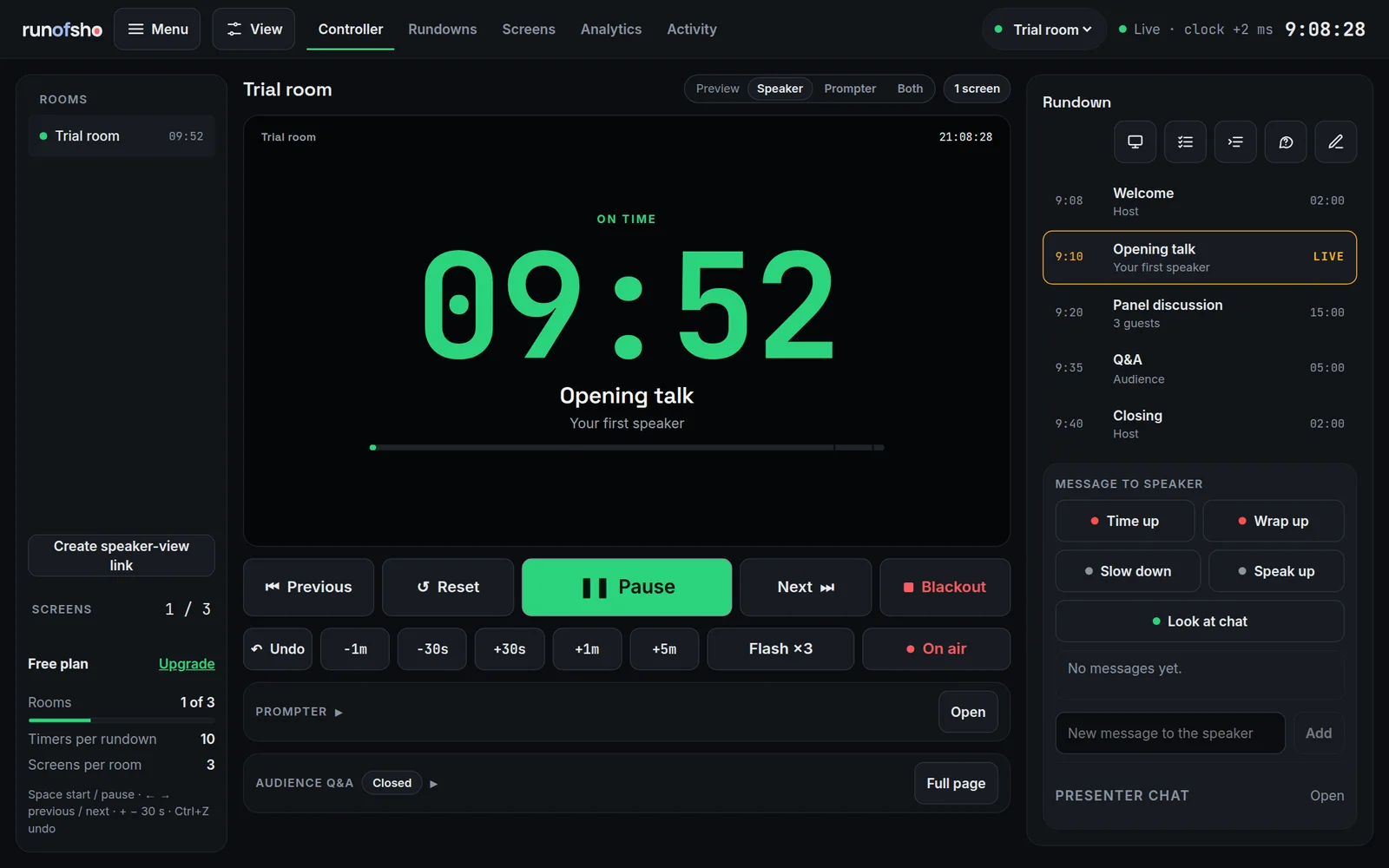
The pastor's screen shows how long is left in the message, in large numbers. It turns amber as the end comes near and red when the time is up, so the pastor can see the time at a glance between points.
When the plan has to change, the booth can say so quietly. Wrap up, Time up and Slow down are one press each, or the booth can type its own. The message appears in large text on the room's screens until the booth clears it, so keep it to words you would not mind the front row reading. If the message needs more time, the booth adds a minute and every start time after it moves with it.
On the Pro plan, the pastor can reply from the stage screen through presenter chat, and the built-in prompter keeps notes or a script on the confidence screen in step with the service. For the conversation before Sunday, read keeping speakers on time.
Run the 9:00 and the 11:00 from one rundown
Many churches run the same service two or three times. In runofsho that is still one rundown and one room:
- Service times. Add each service to the rundown. The times move to whichever service is running.
- Rows for one service. A baptism at 11:00 only, or a children's nativity in the early Christmas Eve service, is ticked for that service. In the others it is greyed out and takes no time.
- Reset for the next service. One press at the end of the 9:00, or the room does it by itself before the 11:00. Every screen and link stays the same.
- A holding screen. Between services the stage and lobby screens show the next service, a countdown to it and a welcome message, and switch off by themselves when the first timer starts.
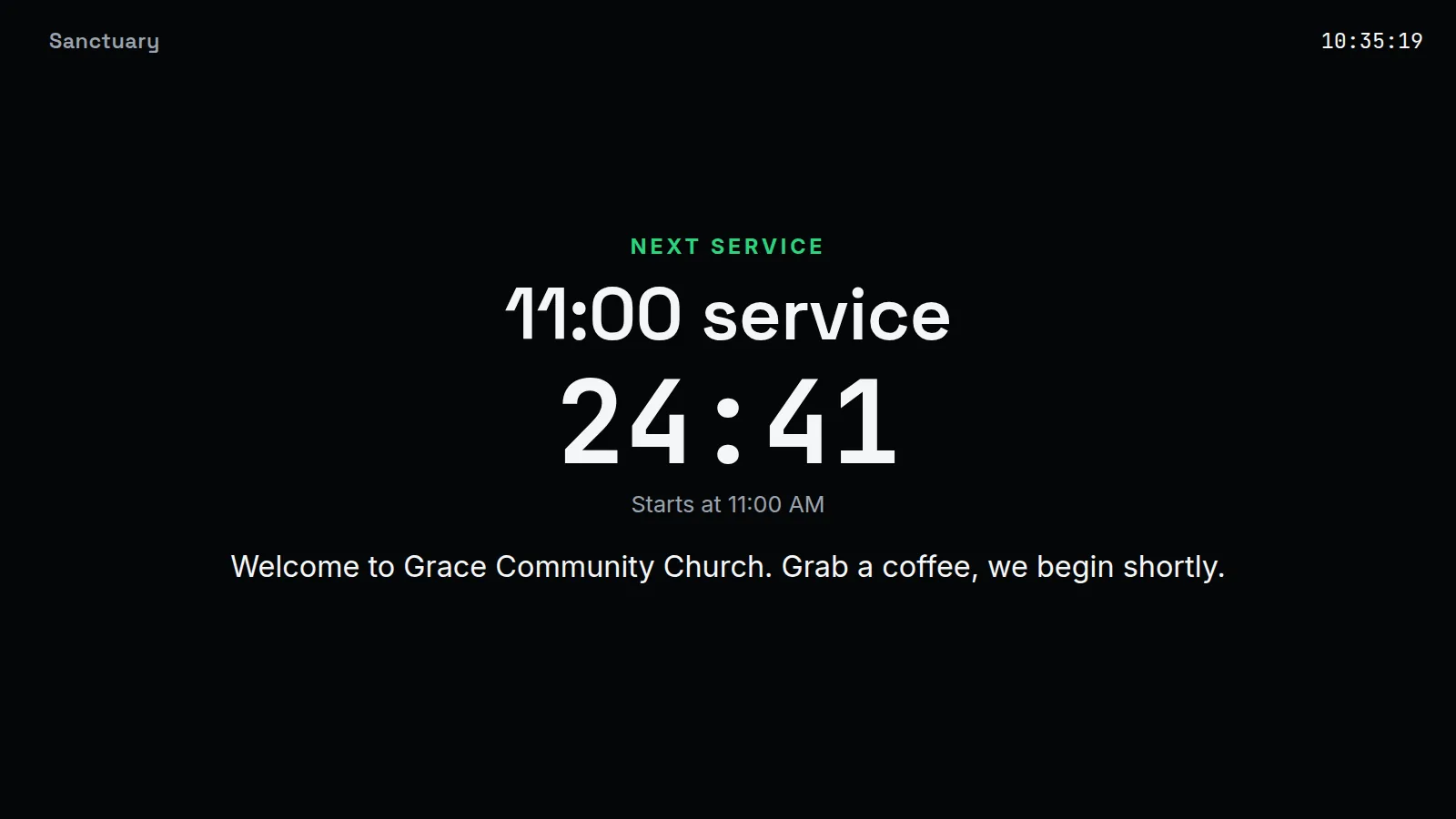
All of this works on every plan, including Free. The step-by-step version, with a screenshot of every dialog, is in how to run multiple Sunday services from one run of show.
Learn from last Sunday
While the service runs, runofsho records how long each item really took, and the booth sees how far over or under the plan the service is. On the Studio plan, the timing report puts the planned length next to the actual one for every item and compares the 9:00 and 11:00 services side by side.
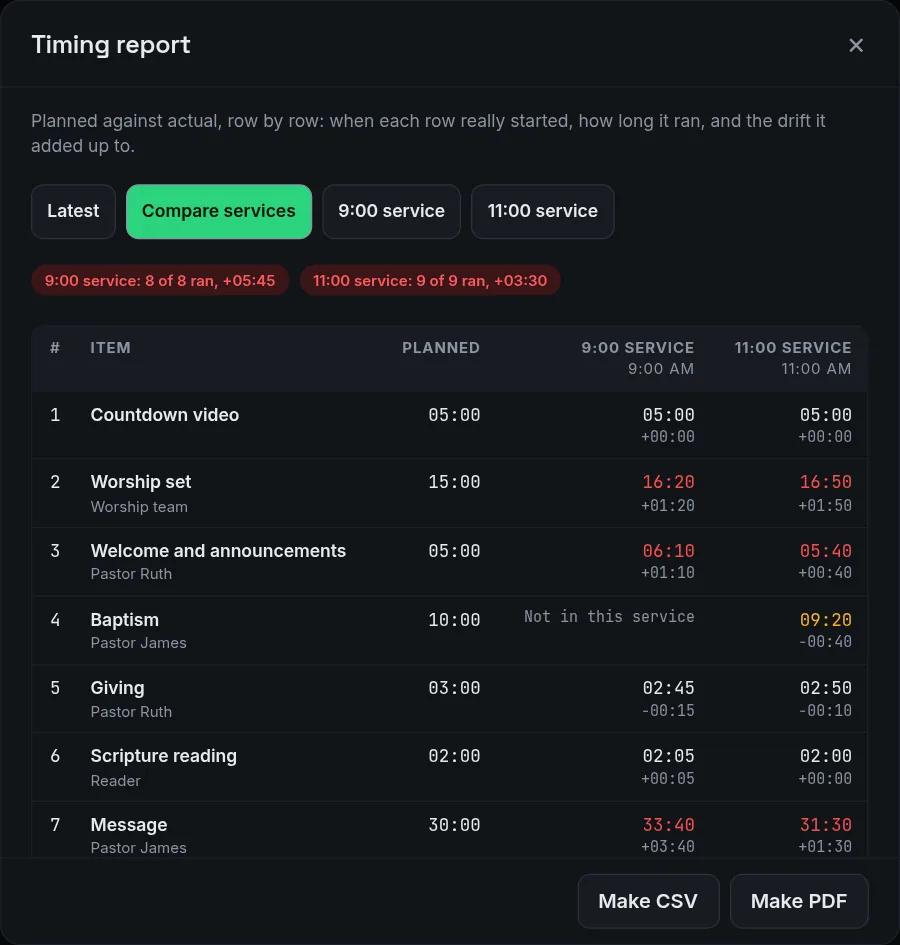
A worship set that runs over by two minutes every week is a pattern, not an accident. The report turns a Monday conversation about feelings into one about numbers.
Where it fits with Planning Center and ProPresenter
Most churches already plan in one tool and put lyrics on screen with another. runofsho is not meant to replace either. As of November 20, 2026:
| Tool | What it is for | Where runofsho fits |
|---|---|---|
| Planning Center Services | Worship planning, volunteer scheduling, team communication and rehearsal tools. Services LIVE shows the team which service item is happening in real time | Keep scheduling people and songs there. runofsho runs the timing on the day: countdowns, messages to the stage, screens and the record of how long each item ran |
| ProPresenter | Lyrics, scripture, slides and media on the screens, with stage screens and stage messages | Keep lyrics and slides there. runofsho drives the timing view for the pastor, the booth and the lobby from the service plan |
If your team only needs the current item on a phone and already pays for Planning Center, Services LIVE may be enough. runofsho is worth it when the stage needs a countdown, the booth needs to adjust the time live, or you run the same service more than once.
Which plan a church needs
| Your church | Plan | Why |
|---|---|---|
| Trying it out, or a short midweek service | Free | 3 rooms, 3 connected screens per room and 10 items per rundown, with service times, the holding screen, timers and stage messages |
| A full Sunday service | Pro, $12 a month or $120 a year | A typical service has more than 10 items. Pro removes the item limit and adds 15 screens per room, the prompter, presenter chat and your church's branding on the screens |
| Several services, rooms or campuses with a team | Studio, $39 a month or $390 a year | 5 seats, 50 screens per room, department roles and the timing report that compares services |
| Christmas Eve or Easter only | Event Pass, from $29 once | Pro or Studio for 30 days. One payment, no renewal |
The free worship service template has 15 items, so it needs Pro or an Event Pass to run in full. All prices and limits are on the pricing page.
When something else fits better
- No reliable internet in the building. runofsho runs in the browser and needs a connection. A local tool such as Ontime is the better choice.
- You need lyrics and slides. That is presentation software's job. Use ProPresenter or similar alongside runofsho.
- You need volunteer scheduling. Planning Center Services and tools like it do that. runofsho does not schedule people.
- Hardware buttons on day one. Stream Deck and Bitfocus Companion control is built on the public API and designed to work with those panels, but it is still being tested on physical hardware.
Getting ready for your first Sunday
- Start from the plan you have. Open the worship service template or paste your order of service into the free run of show builder, and set real lengths.
- Try it in the sample room. Start a cue, add a minute and send a message, with no account.
- Set up one room for the sanctuary. Create the stage monitor, confidence screen and lobby display links and open each on its screen.
- Send the crew link once. The band, cameras and kids' ministry follow along on their phones.
- Run a rehearsal. Call the run-through from the booth the way you will on Sunday, and let the pastor see the countdown before it matters.
For Christmas Eve, the candlelight service template and the Christmas Eve planning calendar cover the weeks before.
FAQ
Is runofsho a replacement for Planning Center or ProPresenter?
No. Planning Center Services plans services and schedules volunteers, and ProPresenter puts lyrics and slides on screen. runofsho runs the timing of the service on the day: the live rundown, countdowns for the stage, messages to the pastor and screens for the booth and lobby.
Do volunteers need accounts or an app?
No. Crew and guest links are read-only and open in any modern browser. Output links turn a browser into a stage monitor or lobby display. Only the person who builds and runs the service needs an account.
Can the pastor see how much time is left?
Yes. A stage screen shows a large countdown for the current item that turns amber near the end and red when time is up. The booth can send Wrap up, Time up or a typed message to that screen without walking on stage.
Can we run several services from the same plan?
Yes. Add each service time to the rundown, mark items that happen in one service only, and reset the room between services. The screens and links stay the same, and a holding screen counts down to the next service. This works on every plan, including Free.
Does it need internet in the building?
Yes. runofsho runs in the browser and every screen follows the room over the internet. If your building has no reliable connection, a tool that runs on the local network, such as Ontime, is the better choice.
How much does it cost for a church?
Free covers 3 rooms, 3 screens per room and 10 items per rundown. Most Sunday services have more than 10 items, so most churches will want Pro at $12 a month or $120 a year. Studio is $39 a month for teams. For Christmas Eve or Easter only, an Event Pass gives Pro for 30 days for $29, with no renewal.