Run of show software for live events

Your whole show.
On the same page.

Collaborative rundowns, live timers and a built-in prompter.
Keep your crew aligned from rehearsal to wrap.

Explore the controls. No account needed for this preview.

Make the plan.

Change a duration. The schedule follows.

Illustrative interface · No sound 0:00 / 0:20
Built for everyone on comms
  • Show callers
  • Producers
  • Stage managers
  • Technical directors
  • Audio
  • Lighting
  • Graphics
  • Prompter ops

From first draft to final cue

One workflow. Every role.

Less jumping between tools. More staying in the moment.

01 / TIMING

Timing that does its own math.

Change one duration and every start time after it moves with it. Add a minute live and the whole room sees what it costs.

  • Start times recalculate automatically
  • Over and under shown against the plan
  • Add or trim time while the show runs
02 / SHOW CALLING

Everyone follows the show caller.

Call the next cue once. Crew views, stage displays and timers move together, so nobody has to ask where you are.

  • One active cue across every device
  • Actual run times recorded as you go
  • Runs in any browser, nothing to install

03 / ROLES

One rundown. The right view for each role.

Audio sees audio. Lighting sees lighting. Guests see only what you share. It is the same show, without the noise.

  • Department columns and private notes
  • Scoped links for guests and crew
  • Personal views that change nobody else's

Producers see every column.

On show day

Every screen in the room.
On the same cue.

Confidence monitors, backstage displays, the prompter and the lobby agenda all follow one rundown. Any browser can be an output.

Illustrative outputs
  • Wrap-up colours

    Green, amber, red. Talent always knows where they stand.

  • Messages to stage

    Send a note to the confidence monitor from the booth.

  • Built-in prompter

    Scripts follow the same show, at the same place on every display.

The real screens

What opens when you press Try.

Taken from a free trial room, exactly as it opens: no mock-ups. Dark by default for the booth, with light palettes for the office.

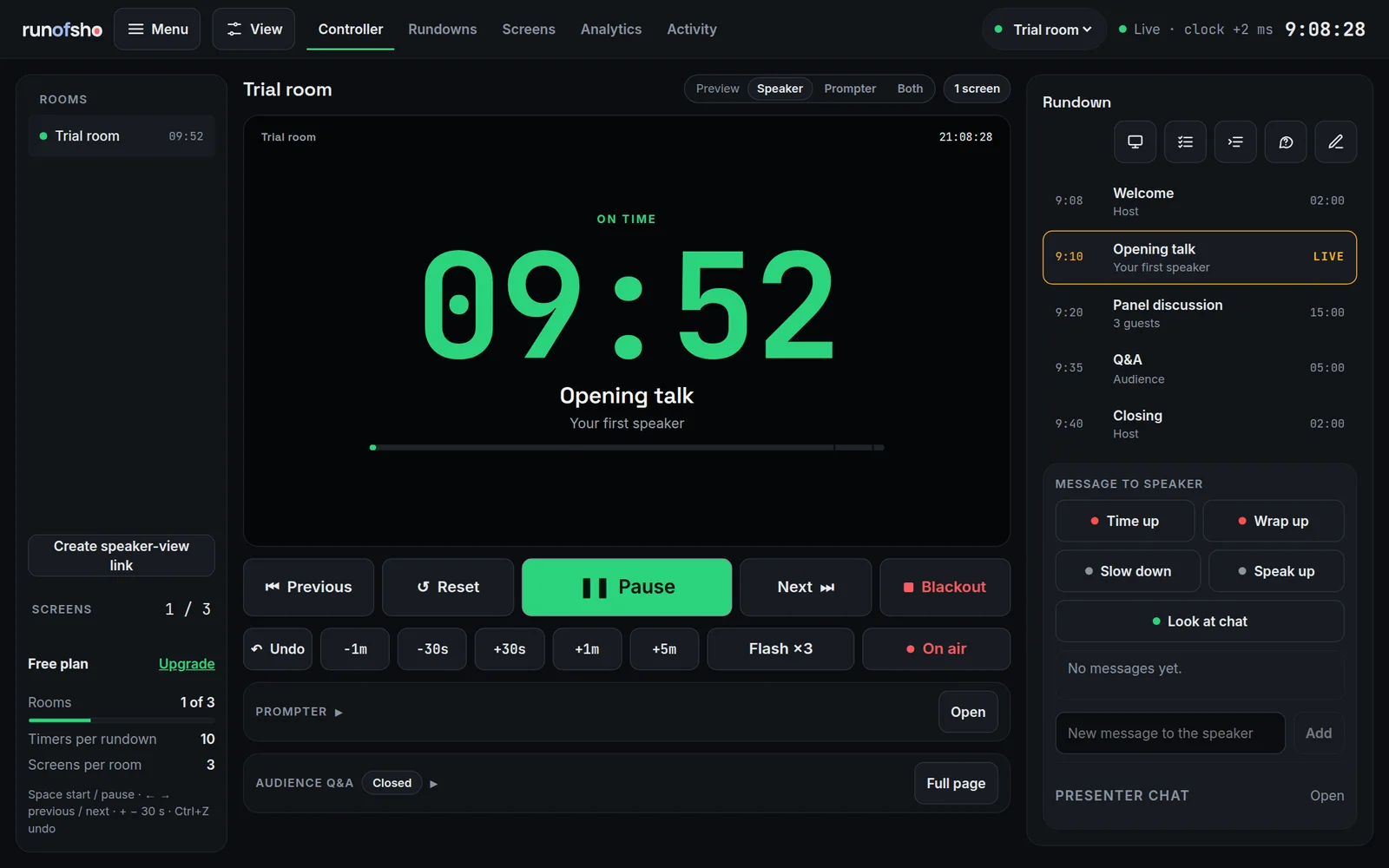
The runofsho controller in a trial room: a large countdown for the live segment, Previous, Pause and Next buttons, quick time adjustments, the rundown on the right and one-tap messages to the speaker.
Controller. Start, pause, nudge the clock and message the stage from one screen.
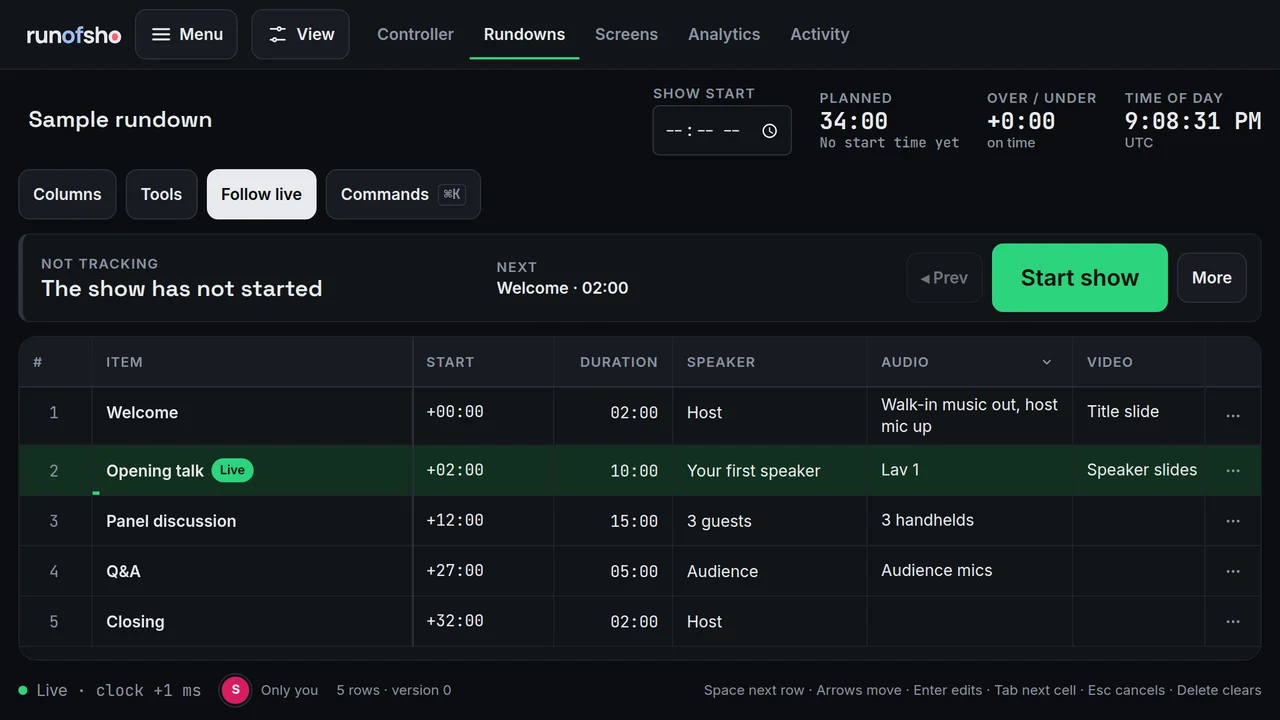
The runofsho rundown editor: rows with start offsets, durations, speaker, audio and video columns, the live row highlighted, and planned length and over or under at the top.
Rundown editor. Change a duration and every later start follows.
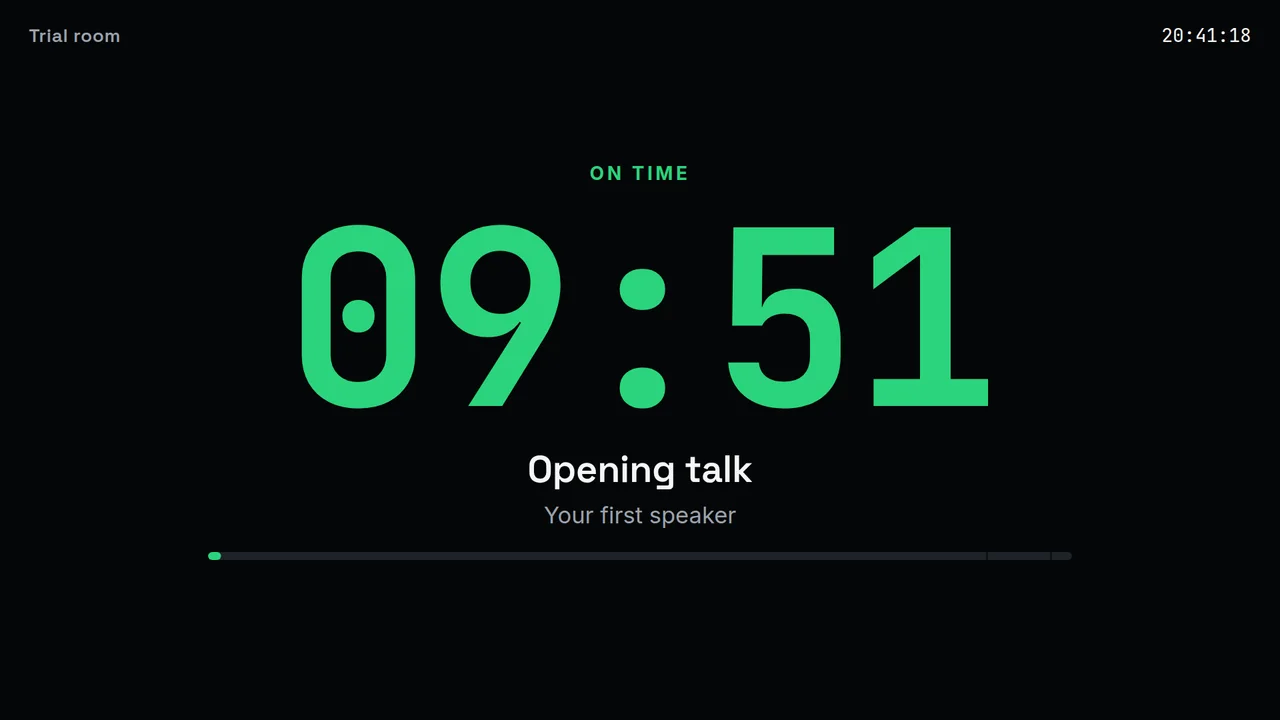
The runofsho speaker view: a full-screen green countdown with the segment title, the speaker's name and a progress bar.
Speaker view. Any browser, phone or TV on the same cue.

The 60-second tour

See a show
come together.

From the first edit to the final cue. Take a closer look at how the whole team stays on the same page.

Interactive concept tour · Captions included

Different stages. Same clarity.

Whatever the show,
bring everyone together.

For the people behind the scenes who make every moment happen.

FROM OPENING REMARKS TO THE FINAL PANEL

A clear plan for a busy stage.

Keep speakers, stage managers and production teams working from the same rundown. Make room for the changes that happen between rehearsal and showtime.

Speaker timersShared rundownsPresenter messages

For production houses

Run every client's show from one place.

When you produce more than one event, the work around the rundown matters as much as the rundown itself.

Client workspaces

Keep each client's events, rooms and keys separate.

Roles and scoped links

Guest, crew, department and editor access, each with its own limits.

Checkpoints and history

Name a version before doors. Compare or restore it later.

Audit trail

See who changed what, from which device, and when.

Timing reports

Planned against actual, by segment and speaker. Export to CSV or PDF.

Show-day monitoring

A test show runs every few minutes, so problems surface before yours does.

Built to connect

Your show.
Your workflow.

A public API for the tools and automations around your production. Designed to sit beside the gear already in your booth.

Read the developer overview
Rundown
Public API
Designed to work with
  • Stream Deck
  • Companion
  • vMix
  • OBS overlays
  • MIDI and OSC
  • Webhooks

Questions, answered

The short version.

What is runofsho?

runofsho is run of show software for live events. One shared rundown drives stage timers, speaker messages, backstage screens and a built-in prompter, so producers, show callers and crew all see the same plan. It runs in a browser with nothing to install.

Who is it for?

Show callers, producers, stage managers and technical directors at conferences, corporate events, broadcasts, livestreams and worship services, and production houses that run shows for several clients.

How much does it cost?

There is a free plan with 3 rooms. Pro is $12 a month and Studio is $39 a month, or you can buy a 30-day Event Pass from $29 for a one-off show. See pricing for limits and add-ons.

How is it different from a spreadsheet?

A spreadsheet holds the plan. runofsho also runs it: start times recalculate when a duration changes, the active cue is highlighted on every device, and timers and messages reach the stage. You can still start from a template or import a CSV.

Do guests and crew need accounts?

No. You share a link. Guest and crew links are read-only, department links can edit only their own columns, and output links turn any browser into a stage timer or backstage screen.

Does it work with Stream Deck, Companion, vMix and OBS?

It is designed to. A Companion module, vMix data feeds, transparent overlays for OBS, and Stream Deck, MIDI and OSC control maps are built on the public API. They are still being validated against physical hardware ahead of launch.

Ready for your next cue?

Your next show starts here.

One shared plan. A little more breathing room.

The 60-second tour

Your whole show, in motion.

01 / ONE SHARED SHOW

Your whole show. On the same page.

Your rundown. Your crew. Your presenters. One shared show.

0:00 / 1:00

Illustrative interface · Captioned tour · No recorded audio

Take the controls

Meet your next show.

You're in a sample room. Try the controls below; everything stays in this preview and nothing is saved.

GIVE IT A GO
  1. 1Start the cue
  2. 2Add a minute
  3. 3Send a message
0 of 3 sample actions explored

Ready when you are. Start the keynote to see the timer run.