For broadcast
Rundown software for broadcasts and livestreams
A live show has an on-air time, an off-air time and no second take. runofsho keeps the gallery, the floor and the talent on one rundown that counts every segment against the time you have left.
runofsho is browser-based rundown software for livestreams, webcasts and studio shows. The producer builds the rundown with a column for each department. The show caller takes each cue, and the over/under shows how far the show is from its off-air time. A prompter, from the Pro plan, follows the cue. Talent see a countdown and messages from the gallery, and an overlay view puts the timer into OBS or vMix as a browser source. runofsho does not fire a vision mixer or playout from the rundown and has no MOS support. For newsroom automation, look at Cuez.
ON THIS PAGE
- What a live show needs from the rundown
- A rundown the gallery and the floor share
- Hit the off-air time
- Scripts and the prompter
- A countdown and messages for talent
- Put the clock in the program
- Allow for stream delay
- Control it from the desk
- Where it fits in a control room
- Which plan a live show needs
- When something else fits better
- Getting ready for a live show
- FAQ
A livestream producer and a network gallery have the same problem at different sizes. The show starts at a fixed time and ends at a fixed time. In between, an interview runs long, a clip is 20 seconds shorter than the log said, and the last segment has to absorb the difference without the audience noticing.
runofsho is built for the timing half of that problem. It is the rundown everyone reads from and the clock everyone works to. It is not a vision mixer, a playout server or a newsroom system, and this page says where those start.
What a live show needs from the rundown
Try the last six and a half minutes of the studio rundown: viewer questions, the host's close and credits. If questions run 30 seconds long, call the close in one minute rather than 90 seconds. The credits roll on time without cutting the music short.
- Every segment against the clock. Planned length, actual length and what that does to the off-air time, while the show is running.
- One version for the gallery and the floor. The director, the floor manager, audio, graphics and playback read the same rows, each with their own column.
- A script that keeps up. When the running order changes, the prompter should already be on the right page.
- Talent who know how long they have. A countdown and a message on a floor monitor, without anyone waving.
- The clock in the program. A countdown to air, or a segment timer, as a graphic.
- No rollout. A freelance crew should be able to follow from a link.
A rundown the gallery and the floor share
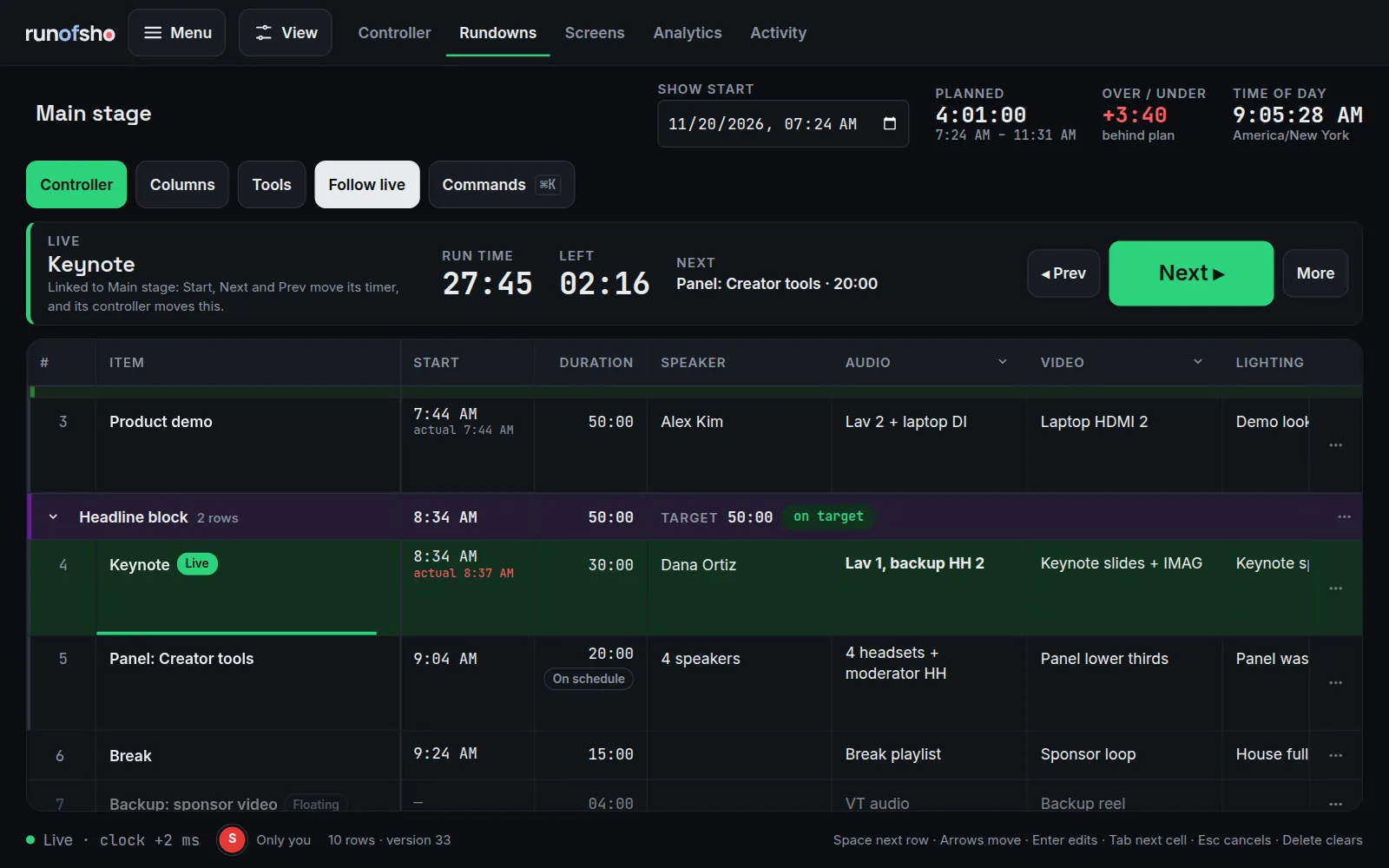
Build the show as rows: pre-show checks, cold open, titles, segments, clip packages, breaks, close and credits. Each row has a length and your own columns, such as camera, audio, graphics and playback. Lengths can be as short as a 30-second cold open. Start times are worked out from the lengths, so trimming an interview from 6:00 to 5:30 moves every row after it.
- Groups with a target length hold a block to its time: three segments that must fit 12 minutes before the break.
- Hard starts fix a row to a clock time, such as the top of the hour or the return from a break.
- Floating rows keep a standby clip in the rundown without counting towards the running time.
- Several people edit at once. Rows can be locked, every cell keeps its history, and the editor follows the live row while the show runs.
Hit the off-air time
The show caller presses Next on each cue, and those presses record how long each row really ran. The header shows the planned end and the over/under, so the gallery sees "+0:40" while there is still a segment left to take it out of.
- Trim live. Take 30 seconds or a minute off the current row, or add it, and every start time after it moves.
- Keep a pad. A short segment near the end that can stretch or drop is how a show lands on time. The live broadcast rundown template is a 30-minute studio show in 17 cues with a pad built in.
- Back-time from the out. Back-timing and hard outs explains the method, and the back-time calculator works out when a segment must start to finish on time.
Scripts and the prompter
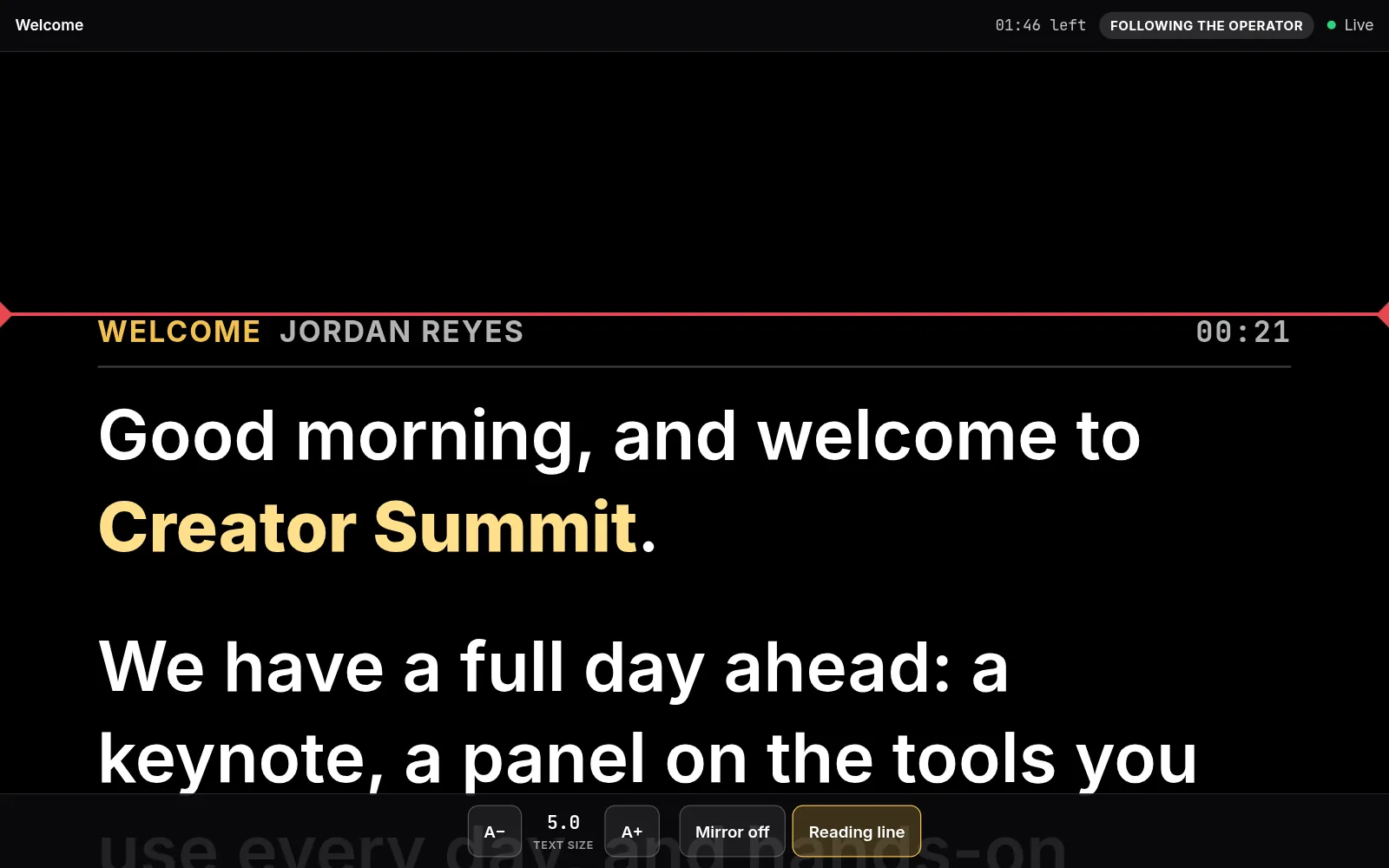
On Pro, the prompter shows the script column of the rundown and moves to the right script as the show caller takes each cue.
- The controller has a prompter remote for play, pause, speed and jumps, and every prompter display follows it.
- Text size, a mirror for prompter glass and a reading line are set on the screen.
- The read-time tool estimates how long a script takes to read aloud, so the length in the rundown is realistic.
A countdown and messages for talent
A floor monitor or a tablet opens an output link and shows the time left in the segment in large numbers. It turns amber near the end and red at zero. The gallery can put a message on that screen with one press: Wrap up, or any message you saved before the show, such as "Stretch". On Pro the talent can answer with a quick reply.
The controller can also flash the screens, black them out and switch on the on air light. A tally view gives a camera position its own light.
Put the clock in the program
The overlay view is a graphic of the timer on a transparent background. Add it to OBS or vMix as a browser source and the countdown to air, or the segment clock, sits over the picture. On Free, screens carry a small runofsho mark. Pro replaces it with your own branding.
For vMix, runofsho also publishes the timer and rundown as JSON and XML data feeds that a title can read. That feed, and the Bitfocus Companion, Stream Deck, MIDI and OSC controls, are built on the public API and are still being tested against the real applications and hardware. The developers page has the details.
Allow for stream delay
The audience sees a livestream late, so the clock in the gallery and the clock on a viewer's phone are not the same clock. As of November 21, 2026:
| Delivery | Typical delay | Source |
|---|---|---|
| YouTube Live, ultra-low latency | Under 5 seconds | YouTube Help |
| YouTube Live, low latency | Under 10 seconds | YouTube Help |
| Mux, low latency (LL-HLS) | As low as about 5 seconds | Mux docs |
| Standard HLS delivery | Over 20 seconds, typically 25 to 30 | Mux docs |
Two rules follow. Never cue a remote guest from the public stream. And hold the end slate before you stop the encoder, or the last words are cut off for everyone watching. Timing a hybrid event goes through both.
Control it from the desk
- Keyboard. Space starts and pauses, the arrow keys move to the previous and next cue, and plus and minus change the time.
- Two operators. If two people press Next at the same moment, the show moves on once.
- Automations, on Studio. When a timer reaches zero, or has a set time left, a rule can flash the screens, show a message, switch on air, call a webhook or post to Slack.
- The API. Everything in the app is in the public API, on every plan, with real-time events over Socket.IO or Server-Sent Events. Webhooks are on Pro.
Where it fits in a control room
| You already use | Keep it for | What runofsho adds |
|---|---|---|
| A vision mixer or switcher, such as vMix, OBS or an ATEM | Cutting cameras, playing clips and keying graphics | The rundown and timing beside it, and a timer overlay as a browser source |
| A graphics system | Lower thirds and full-frame graphics | A graphics column on every row, so the operator knows what is next |
| Comms | Talking to the crew | The live row on every crew device, so fewer questions go over comms |
| A streaming platform | Carrying the stream | One clock for the gallery, the floor and the countdown to air |
| A newsroom system with MOS | Stories, scripts and device control | Nothing. runofsho does not connect to it. See below |
Which plan a live show needs
| Your show | Plan | Why |
|---|---|---|
| Trying it out, or a short stream | Free | 3 rooms, 3 connected screens per room and 10 items per rundown, with the overlay view and API access |
| A weekly stream with one producer | Pro, $12 a month or $120 a year | Unlimited rundown items, 15 screens per room, the prompter, talent replies, your branding on the overlay and webhooks |
| A one-off webcast | Event Pass: Pro, $29 once | Pro for 30 days, with no renewal |
| A production team with several shows | Studio, $39 a month or $390 a year | 5 seats, department links, automations, timing reports and the audit log |
The live broadcast rundown template has 17 cues, so it needs Pro or an Event Pass to run in full. All prices and limits are on the pricing page.
When something else fits better
- The rundown should run the equipment. If one press has to cut the mixer, roll the clip and fire the graphic, you need broadcast automation. Cuez does that. runofsho does not.
- You work in a newsroom. runofsho has no MOS support and does not connect to ENPS or iNEWS.
- You need timecode. runofsho works to the second on a shared clock. It does not read or generate LTC or MTC.
- The studio has no reliable internet. Ontime runs on your own network.
- You need hardware control on day one. Stream Deck and Companion control is built, but it is still being tested on physical hardware. Timers Studio and Stagetimer both list working Companion modules.
Getting ready for a live show
- Start from the rundown you have. Open the live broadcast rundown template or paste your running order into the free run of show builder.
- Try it in the sample room. Start a cue, take 30 seconds off and send a message, with no account.
- Fix the times that cannot move. The on-air time, the breaks and the off-air time.
- Open the screens. A floor monitor for talent, the prompter, and the overlay as a browser source in your mixer.
- Send the crew link. Camera, audio, graphics and playback follow the live row on their own devices.
- Rehearse to time. Run the show against the clock and see where the pad has to go.
FAQ
What is a broadcast rundown?
A rundown is the ordered list of every segment in a show, with its length, its start time and what each department does during it. Live events usually call the same document a run of show. In runofsho it is one live document that also drives the timers, the prompter and the crew's screens.
Can runofsho be used for a livestream?
Yes. It runs the timing of a livestream or webcast: the rundown, the over/under against the off-air time, a countdown and messages for talent, a prompter from the Pro plan, and a timer overlay. The stream itself is carried by your encoder and streaming platform.
Does runofsho work with OBS and vMix?
The overlay view is a transparent timer graphic that you add to OBS or vMix as a browser source. runofsho also publishes JSON and XML data feeds for vMix titles. Those feeds are built and still being tested against vMix. runofsho does not switch scenes or inputs from the rundown.
Does runofsho have a teleprompter?
Yes, from the Pro plan at $12 a month. It shows the script column of the rundown, follows the show caller from cue to cue, and has a remote for play, pause and speed, with a mirror setting for prompter glass.
Does runofsho support MOS or studio automation?
No. runofsho has no MOS support and does not fire a vision mixer, graphics or playout from the rundown. For newsroom workflows and studio automation, look at Cuez or a similar broadcast platform.
What is the difference between a rundown and a run of show?
They are the same kind of document. "Rundown" is the usual word in broadcast, and "run of show" in live events. Both list every segment in order with a time, a length and production notes. What is a run of show covers the other names for it.
How much does runofsho cost for a weekly show?
Pro is $12 a month or $120 a year for one producer, with the prompter and no limit on rundown items. Studio is $39 a month or $390 a year with 5 seats. Free covers 3 rooms and 10 items per rundown, and includes API access.